
Compliant Ad Domains: How to Keep Meta Tracking Clean and Compliant
Overview
If your brand falls into a restricted category, Compliant Ad Domains feature helps improve compliance by making your checkout events appear to come from a clean landing-page domain, not your main store.
This guide is for informational purposes only and does not constitute legal advice.
What Compliant Ad Domains is (and what it does)
In Popsixle Unrestricted, Compliant Ad Domains is a setup that helps keep Meta’s “visible compliance surface” pointed at a clean, compliant landing-page domain — even if shoppers ultimately continue on to your full store to browse and purchase.
In plain terms:
Your ads can send shoppers to a compliant landing domain (the “safe surface”).
Shoppers can still click through and complete checkout on your main store.
Popsixle helps ensure the Meta event payloads (the data Meta receives) reflect the compliant surface, which reduces the risk of account disruptions caused by Meta evaluating a restricted or non-compliant domain.
This is especially useful for brands in restricted or sensitive categories (health/wellness, supplements, hemp/CBD, etc.) where Meta may categorize domains, restrict datasets, or reject ads based on the overall end-user experience.
Why Use Domain Compliant Ad Domains?
When Meta detects events coming from a non-compliant domain, it may flag your pixel or restrict ad performance. Popsixle’s Compliant Ads Domains and session stitching features work together to:
Rewrite server-side events so Meta sees them coming from your clean landing page
Match browser and server events perfectly to prevent deduplication issues
This helps protect your pixel and keep your tracking stable.
Before You Begin
Before turning on Compliant Ad Domains, you’ll want to confirm the following:
Approved Compliance smoke test (Read more Popsixle Landing Page Compliance Smoke Test)
Compliant landing site (e.g.,
clean-domain.com)Popsixle installed and active on your store
Skip the data connection step in the onboarding wizard for now.
A clean Meta Pixel / Dataset
If your pixel/dataset has already been restricted/categorized, you may need a clean replacement before launching.
Optional: Admin access to your main Shopify store (the one handling checkout)
How to set it up
Step 1: Confirm your compliant landing domain
Decide which domain Meta should “see” as the compliant surface (example:
try.yourbrand.com).Confirm your ads will send traffic to this compliant landing domain (not directly to the main store domain).
Step 2 — Install Popsixle on the landing domain (if it’s separate)
If your compliant landing page is on a different domain than your main Shopify store:
Add the Popsixle snippet to the landing domain (per the Popsixle dashboard instructions).
Run a detection check in Popsixle to confirm the snippet is live.
Read more here: Advanced Setup: External Landing Pages
Step 3 — Add the landing domain in Popsixle Domains and Enable Compliant Ad Domains feature
In Popsixle:
Go to Shop Settings > Account Settings > Landing Pages > Add Landing page and follow the steps mentioned in the flow.
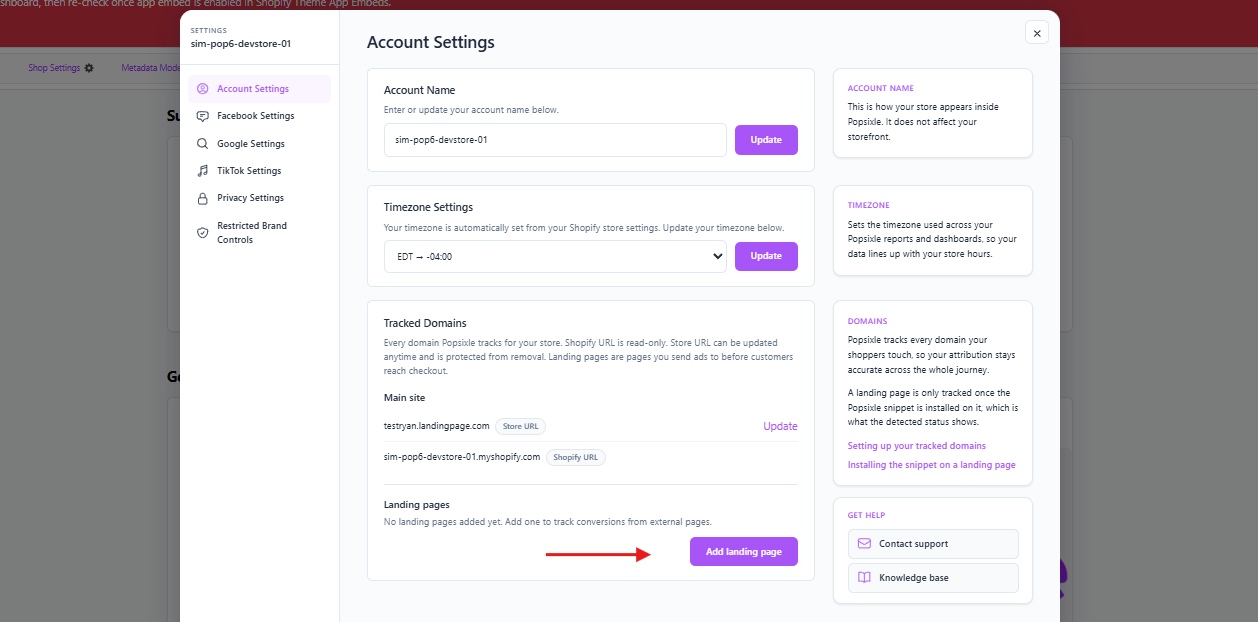
Read more here: Advanced Setup: External Landing Pages
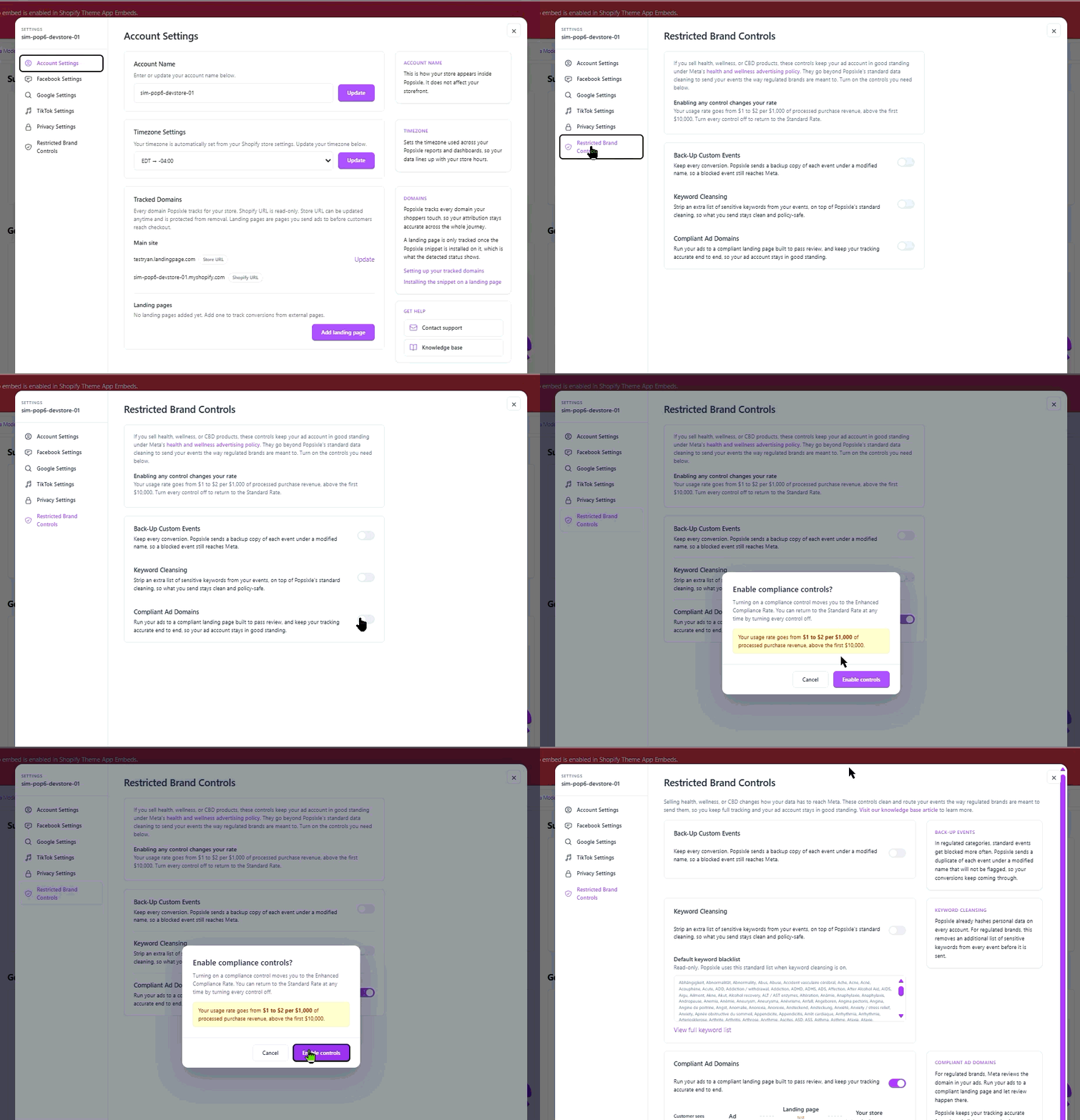
Go to Restricted Brand Controls > Compliant Ad Domains > Switch ON
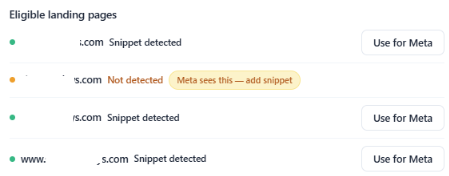
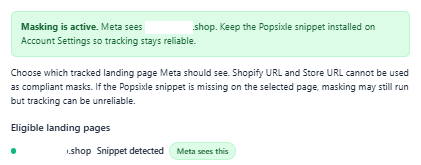
In Eligible Landing Pages, choose your main compliant page and then click Use for Meta
Notes:
Make sure that the Popsixle code snippet is added properly, it would show as either Not detected or Snippet detected.
If there are multiple landing pages, only use the compliant landing page that has passed the compliance smoke test.
You can add multiple sites on the Domain settings and add the snippet to extend tracking to those pages/sites, but we're only able to connect our Compliant Ad Domain/Domain Override to a single site/page. Everything else will be consolidated under one domain before it's being sent back to Meta
Step 4 — Connect Popsixle to Meta (CAPI-first)
Follow the steps on this guide for more information: Popsixle Step-by-Step Setup Guide: Meta Integration
Compliance Checklist
✅ Popsixle installed on main Shopify store
✅ Compliant Ad Domains enabled
✅ Popsixle snippet added to clean-domain
✅ Old Meta pixel removed from landing page
✅ Shopify → Meta data sharing turned OFF
✅ Purchase (Server) event shows clean-domain.com
✅ No restricted category flags in Events Manager
Frequently Asked Questions
Will Compliant Ad Domains “hide” my main store from Meta?
Compliant Ad Domains is designed to keep Meta’s compliance surface anchored to the compliant domain for tracking payloads and routing. Shoppers can still browse and buy on your main store, but the goal is to reduce the chance Meta evaluates your main store domain as the primary surface for ad-driven tracking.
Do I still need a compliant landing page if Popsixle is installed?
Yes. Unrestricted depends on having a compliant landing surface that Meta can review safely. Compliant Ad Domains feature helps align tracking to that surface — it doesn’t replace the need for compliance.
Can I run multiple landing pages/domains?
Yes, but we're only able to connect our Compliant Ad Domain/Domain Override to a single site/page. Everything else will be consolidated under one domain before it's being sent back to Meta
What if my ads are still getting rejected?
Popsixle is primarily handling tracking and data delivery, so it doesn’t directly submit ads for review or change the creative/landing page content Meta evaluates during the approval process.
Ad rejections are usually tied to Meta’s policy review of the ad creative, copy, landing page, domain, or account history rather than the Popsixle connection.
Contact Us
Have questions or concerns? Reach out to the Popsixle via email or through the live chat on our site and a member of our team will get back to you within one business day.