
Popsixle's Unrestricted Brand Control Features
Overview
To help restricted brands comply with Meta’s evolving data policies, Popsixle offers optional features that give you more control over how your event data is sent:
Back-Up Custom Events
Domain Override
Keyword Cleansing
Enabling any of these features improves compliance but increases your usage rate to $2 per $1,000 in processed purchase revenue (above $10,000/month). This enhanced rate applies whether you enable one, two, or all three features and stays the same regardless of how many are turned on.
Pricing Impact
Standard Rate: $1 per $1,000*
Enhanced Rate: $2 per $1,000*
Once you enable any of these features, your account will be billed at the enhanced rate of $2 per $1,000*. This rate is fixed and does not increase if you enable more than one feature.
* All rates apply to processed purchase revenue above $10,000 per month.
Available Features
1. Compliant Ad Domains
What it does
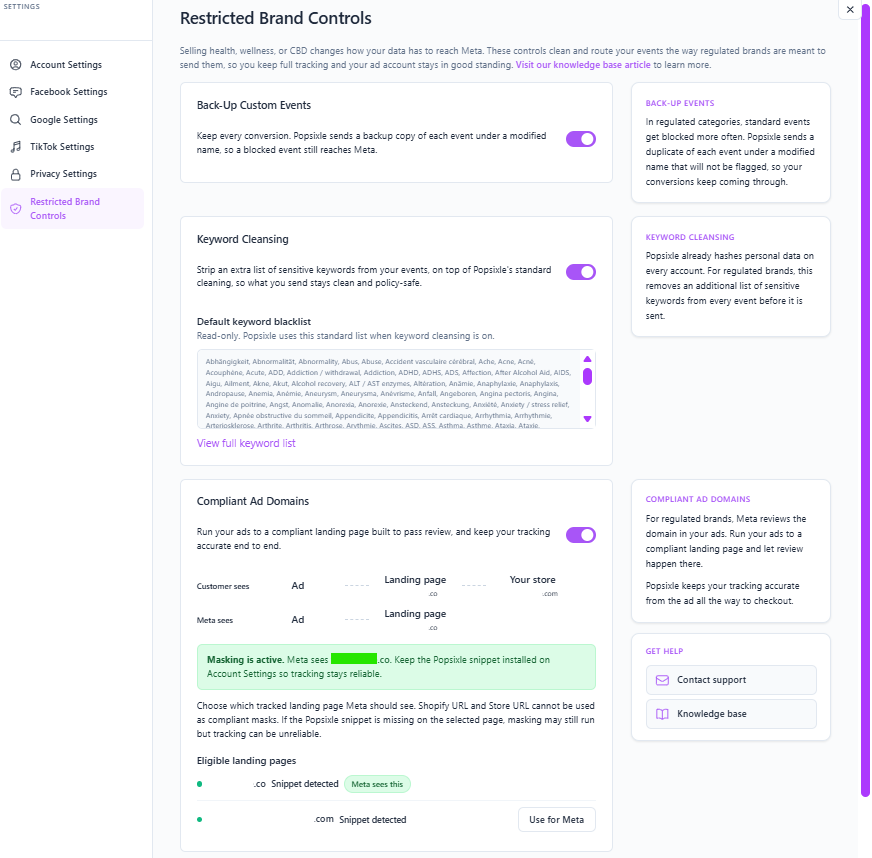
Formerly known as Domain Override, Compliant Ad Domains lets you route ad traffic through a compliant landing page before shoppers continue to your main site.
Why it's useful
This is useful for brands where the main website may contain restricted-category language, product claims, or content that could cause Meta to limit or block event data.
With Compliant Ad Domains, Popsixle can use the approved landing page domain as the event source URL for eligible events, helping Meta evaluate the cleaner, compliant entry points instead of the broader main site.
Read further: Compliant Ad Domains: How to Keep Meta Tracking Clean and Compliant
2. Back-Up Custom Events
What it does
Back-Up Custom Events creates duplicate custom-event versions of key standard events, such as AddToCart, InitiateCheckout, AddPaymentInfo, Purchase, and Subscribe.
Why it's useful
These backup events are designed to help preserve signal delivery if Meta restricts or blocks certain standard events due to category or policy review.
Example
In Meta Events Manager, these usually appear in the format:
Custom_(event abbreviation)
For example:
Custom_ATC
Custom_IC
Custom_API
Custom_P
Custom_S
After turning this feature on, these events may take around 15–30 minutes to appear, depending on event volume.
Read further: Back-Up Custom Events
3. Keyword Cleansing
What it does
Automatically removes blacklisted keywords from event data sent to Meta (e.g., terms related to medical conditions, mental health, or addiction). Click here to view the full list.
Why it's useful
Many standard event payloads may contain terms that can raise compliance flags. This feature filters those out to help keep your data compliant.
Example
Before: 10mg CBD Citrus Gummies
After: Citrus
Read further: Keyword Cleansing: Stay Compliant with Meta’s Brand Restriction Policies
How to Enable Features
To enable any of these features in your Popsixle dashboard:
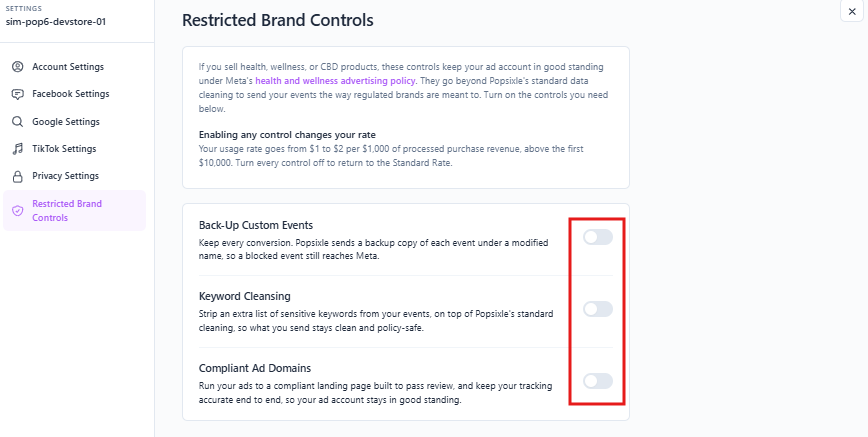
Go to Shop Settings > Restricted Brand Controls.
Toggle on the feature(s) you want to enable.
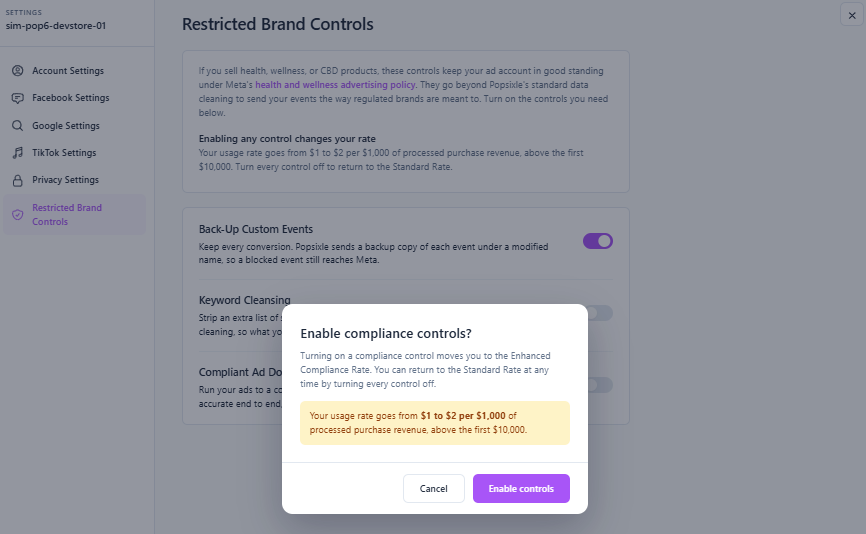
Review the Usage Fee Notice.
Click Accept & Continue to confirm you agree to the updated usage rate.
A confirmation message will appear. The new rate takes effect immediately.
Reminder: Enabling any of these features will automatically switch your pricing plan from $1 to $2 per $1,000*.
Contact Us
Have questions or need help? Reach out via live chat (during business hours) or email us at success@popsixle.com. We’re happy to recommend the best setup for your brand.