
Back-Up Custom Events
Back-Up Custom Events is an Unrestricted-only feature that sends additional “backup” event names to Meta (for example, a backup Purchase event) to support Unrestricted reporting and troubleshooting.
What Back-Up Custom Events is (and what it does)
Back-Up Custom Events is an Unrestricted setting that causes Popsixle to send additional custom event names to Meta alongside the standard funnel events.
These backup events are intended to:
Provide an additional “shadow” signal for Unrestricted reporting/diagnostics
Help create a clearer secondary event trail in Meta Events Manager in situations where Unrestricted setups see inconsistent behavior, categorization, or enforcement-related friction
Important notes:
Back-Up Custom Events are in addition to (not a replacement for) the standard events like Purchase.
This feature is not required for most setups. In many cases, Domain Override / Domain Masking is the primary control that keeps the compliance surface clean.
How to turn it on
Step 1 — Confirm your Unrestricted setup is ready
Before enabling Back-Up Custom Events, make sure:
Your compliant landing page domain strategy is in place
Compliant Ads Domain feature is configured (if applicable)
Conflicting Meta senders (Shopify native data sharing / pixels / other CAPI tools) are disabled unless Popsixle instructed otherwise
Step 2 — Enable Back-Up Custom Events
In Popsixle:
Go to Shop Settings
Open Restricted Brand Controls
Find Back-Up Custom Events
Toggle it ON
Save/Update the setting
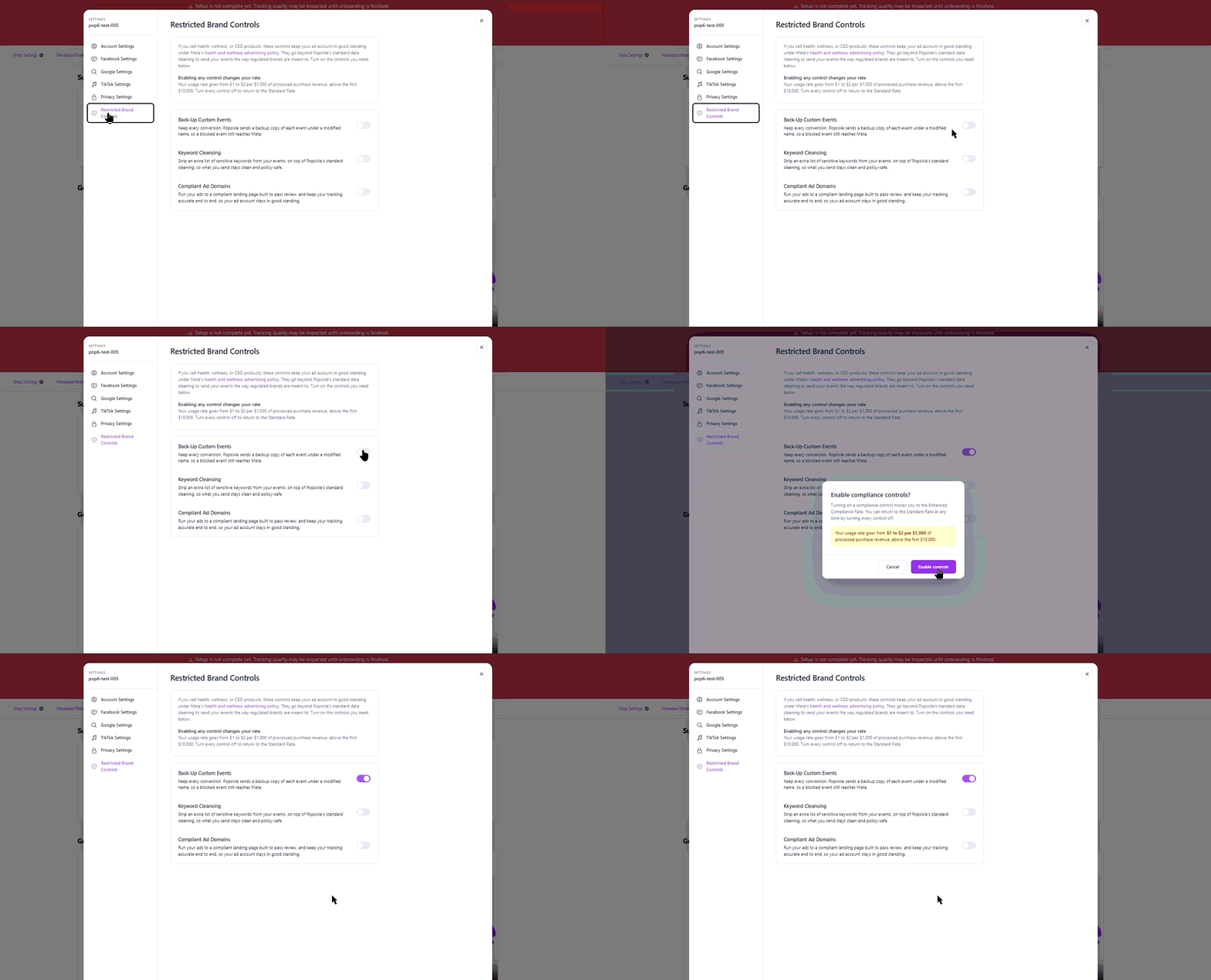
Step 3 — Validate in Meta Events Manager
After enabling:
Check Meta Events Manager to confirm the additional custom event names appear alongside your standard events.
Use Events Manager as the receipt layer for what Meta accepted.
What You’ll See in Meta Events Manager
After enabling Backup Custom Events in Popsixle, the backup events should start appearing in Meta Events Manager once Meta receives enough event activity.
This usually takes around 15–30 minutes, depending on how frequently events are being received on your site.
The backup events will appear using the format:
Custom_(event abbreviation)For example, you may see events like:
Custom_ATC
Custom_IC
Custom_API
Custom_P
Custom_P_N_C
Custom_P_R_C
Custom_S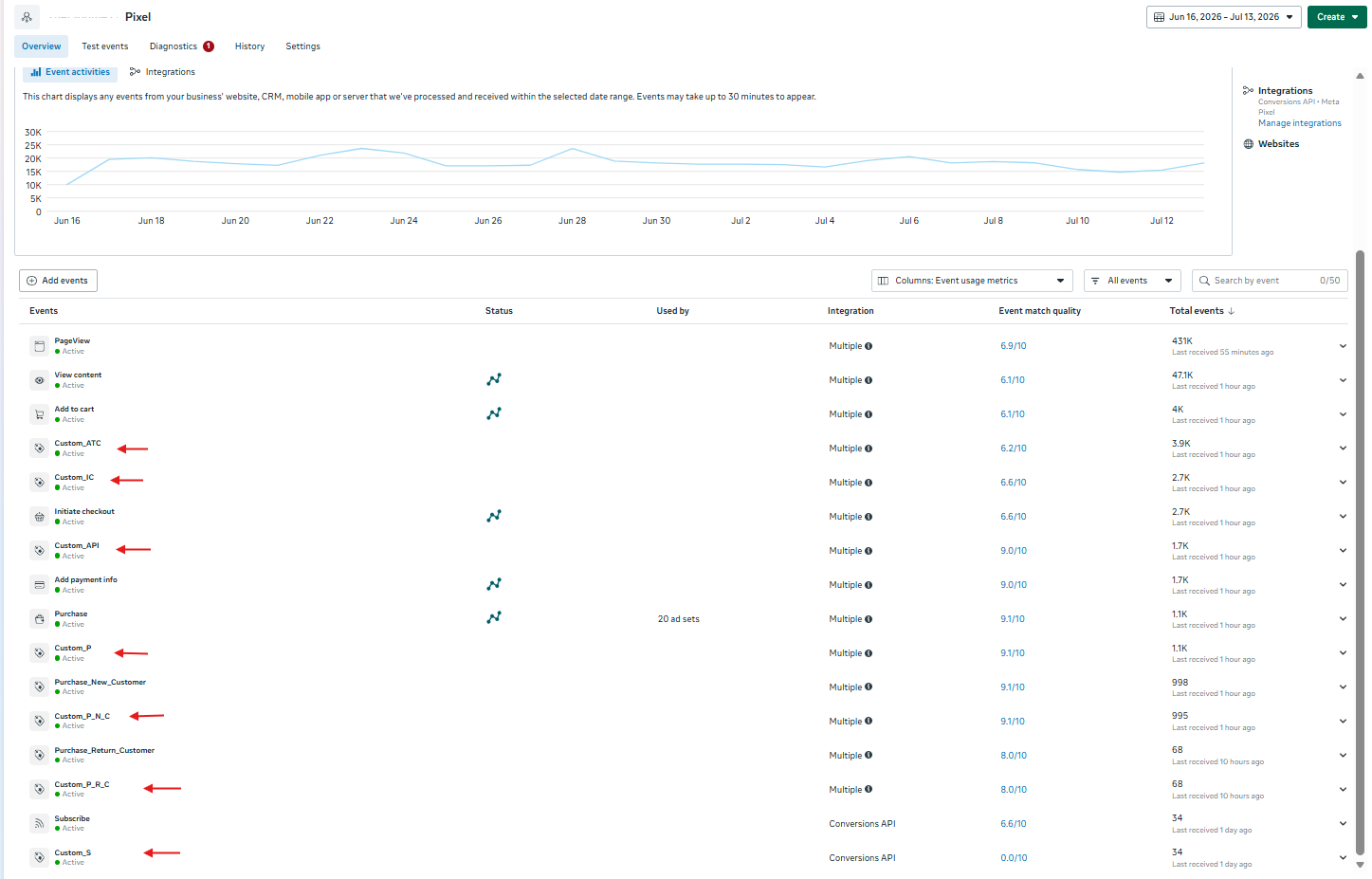
These correspond to backup versions of your standard events, such as AddToCart, InitiateCheckout, AddPaymentInfo, Purchase, Purchase_New_Customer, Purchase_Return_Customer, and Subscribe.
These events are meant to act as backup custom events in case Meta restricts or blocks standard events.
Important: Accept the Backup Events in Meta
After the backup custom events appear, make sure they are accepted in Meta Events Manager.
To review them:
Go to Meta Events Manager
Open your dataset/pixel
Go to Settings
Select Manage Event Blocking
Click Review
Look for the Popsixle backup custom events and accept
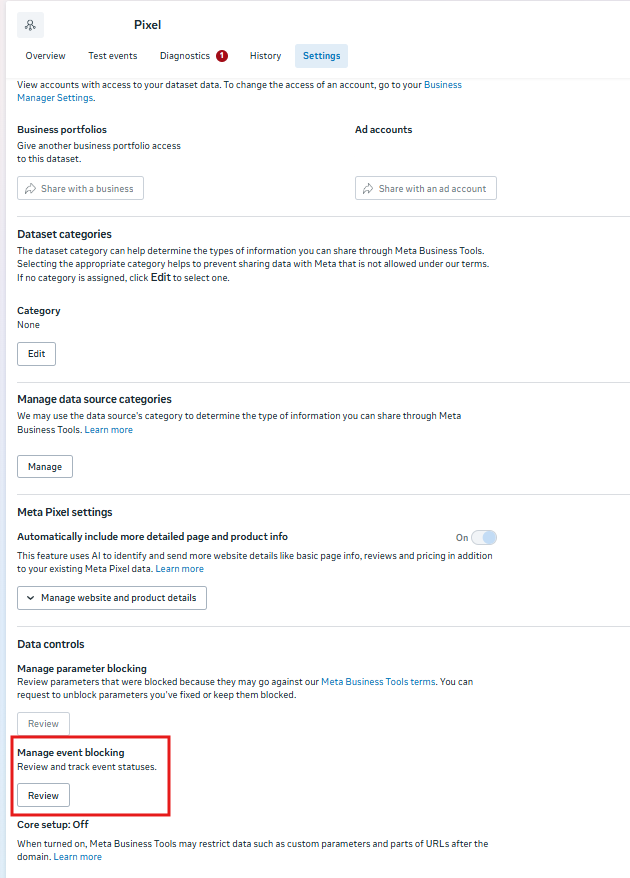
This helps ensure the backup events are not left pending, blocked, or restricted by Meta’s event review settings.
Frequently asked questions
Will Back-Up Custom Events create duplicate conversions?
No, but this feature is mainly meant for restricted-brand diagnostics/reporting. You should be careful not to optimize campaigns to both the standard and backup versions of the same action unless Popsixle explicitly recommends it.
Should I optimize campaigns to the backup event?
Usually no. In most cases, you should optimize to standard Meta events (like Purchase) unless Popsixle has advised a specific custom event strategy.
Do Back-Up Custom Events replace Compliant Ads Domain feature?
No. Compliant Ads Domain feature is a core Unrestricted control for keeping Meta’s compliance surface anchored to a compliant landing domain. Back-Up Custom Events is an additional tool used in certain restricted-brand scenarios.
Why don’t I see Back-Up Custom Events immediately?
It may take some time for new events to appear in Meta surfaces. Also confirm:
Your Meta Pixel/Dataset is connected correctly in Popsixle
Events are actively firing (site traffic / test orders)
Contact Us
Have questions or concerns? Reach out to the Popsixle via email or through the live chat on our site and a member of our team will get back to you within one business day.