
Popsixle's New Customer Targeting Optimization for Meta and TikTok
Data segmentation is a powerful tool for unlocking better ad performance. With an advanced data connection like Popsixle, you can measure the purchase performance of separate segments and audiences (such as new customers vs. returning existing customers) then run new campaigns that optimize to that segmented data, which focuses the algorithm on your specific goal.
Here’s how it works
Popsixle's custom logic pings the Shopify API in real-time to look up any/all historic orders from a specific customer in that particular Shopify store.
Popsixle can separate new customer purchases from returning customer purchases so you can track and optimize ads more effectively.
When a purchase happens, Popsixle checks your Shopify order history in real time:
If the customer has past orders → sends Purchase_Return_Customer event.
If it’s their first order → sends Purchase_New_Customer event.
A standard Purchase event is always sent too.
This lets you see total purchases and the breakdown of new vs. returning customers in Meta/TikTok — and optimize campaigns accordingly.
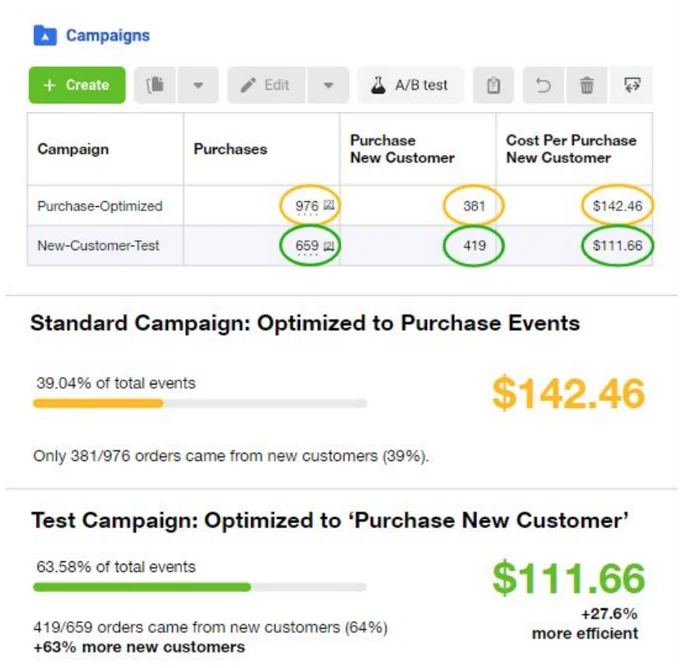
The original test of this feature for Popsixle stores resulted not only in more purchases from new customers, but more efficient ads
New customer order share increased from 39% to 64% (+63% improvement)
CAC dropped from $142 to $112 (+27.6% improvement)
Get Started
Implement the “new customer purchase” event for your store in 3 phases:
Phase 1 – Get Data Flowing
NOTE: Skip this step if you're a current Popsixle Subscriber
Install the Popsixle App in the Shopify app store, then complete the onboarding steps to get the Popsixle connection live on your site: Click here to install
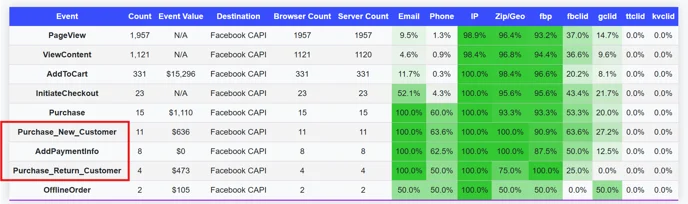
Once our team confirms the new vs return data is flowing, check Data Summary to see the events that Popsixle is processing on your site in real time:
Total purchase events
New vs. return purchase breakdown
All events sent to Meta/TikTok
Phase 2 – Set Up Ads Manager Reporting
Once the data is flowing, you can update your Ads Manager reporting view to add additional custom columns and position Purchase events and Purchases New Customer events side-by-side so it’s easy to see how many orders are from new vs return customers.
In Meta/TikTok Ads Manager, add custom columns for:
Purchase
Purchase_New_Customer
Purchase_Return_Customer
If all events above are already active, make sure to verify the events. Follow this guide: Verify Popsixle's events
If these events don’t appear, you'll need to create a "dummy" campaign to register them as active custom events.
NOTE: First check under Customize column → Custom Conversions if there are events active.
Create a new Lead-objective campaign using manual setup. Name your campaign very clearly, ie. "Dummy Campaign, No Spend"
Under Conversion Type, Website → select target pixel
At the ad set level, Optimization Event metric → Purchase_New_Customer
Trick Meta into believing the dummy campaign is real by setting a budget of $1, and schedule the campaign to go live at some point in the future (like tomorrow)
For Creative:
Creative Source → Manual Upload
Format → Single image or video
Add media → add something basic, like a logo image
Text & Description → write in "Test"
Browser add-on → select "None" to prevent errors
Publish the dummy campaign. Once published, refresh your page and you should see this event show up as a custom column option.
Duplicate the ad to create a dummy campaign for Purchase_Return_Customer
Publish, refresh Ads Manager, confirm events appear in Custom Columns.
You can then delete or shut off the scheduled "dummy" campaign.
Watch this demo video to learn how to set up your dummy campaign: Set up "new customer purchase" events
Phase 3 – Launch Campaigns Optimized for New Customers
After adding new customer tracking to your ad reporting, you may want to test optimizing to this custom event
Make sure you have:
At least 100 total new customer events
Enough budget for 50+ new customer purchases/week
If you meet these requirements, simply create a new campaign and select the Purchase_New_Customer event as your optimization metric
Contact Us
If you have questions or need assistance with any of the steps above, reach out to the Popsixle via email or through the live chat on our site and a member of our team will get back to you within one business day.
We also offer additional consulting for more advanced optimization settings, available through a paid strategy call. Send us an email to learn more, or click here to book a call.