
Popsixle's Pixel Helper
This article will help you understand the functionality of the Popsixle Pixel Helper and how it can help you track Popsixle data on your Shopify site
Enabling the Pixel Helper
In your Popsixle dashboard homepage, find the Pixel Helper section and toggle it ON.
Click the button that appears — this will open your store’s homepage with the Pixel Helper visible.

QUICK NOTE: The Popsixle Pixel Helper popout is only visible to you and not anyone else viewing your store. This does not affect your customer-facing home pages.
What the Pixel Helper Shows You
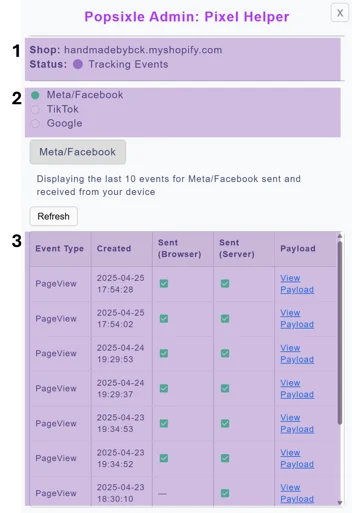
The Pixel Helper has three main sections:
Account Info – Shows your shop URL, Popsixle status, and whether events are being tracked.
Channel Status – This section will show you the status of each channel you are currently connected to.
Green dot = data is flowing
Empty dot = no data is flowing
Event Data – This section will show you the specific events sent via Popsixle browser side or server side (both sent by Popsixle to ensure 100% alignment). The table includes:
Event Type (e.g., Purchase, AddToCart).
Created this is a timestamp for the event.
Sent (Browser) – This shows if the event was sent browser-side by Popsixle
Sent (Server) – his shows if the event was sent server-side by Popsixle
Payload – This gives you link to see detailed information about what was sent as part of the event
Understanding the Payload
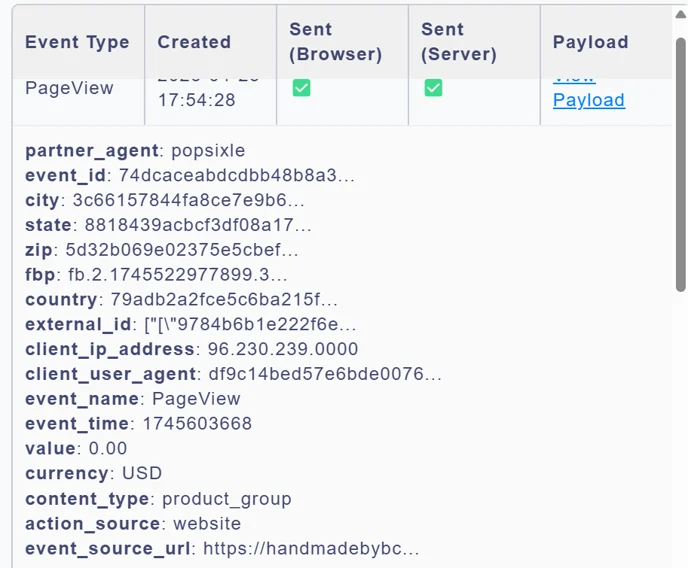
After clicking on "View Payload" a new panel will open with detailed event information. Don't worry if the information seems intimidating! The information is to give you a sense of what data Popsixle is able to track, anonymize and send to ad platforms in a privacy first manner.
Most fields are self explanatory (state, city, zip etc.) but below is an explanation of some of the fields you may not be as familiar with:
fbp: This is a session identifier that is used by Facebook
external_id: This is used to ensure alignment between browser and server events
Contact Us
Have more questions about the Popsixle Pixel Helper? Feel free to reach out to our team at success@popsixle.com and we will get back to you as soon as we can.