
Turn Off Shopify CAPI and Data Sharing for Meta and TikTok
Overview
When onboarding with Popsixle, it’s important to turn off all other server-to-server (CAPI) and browser (pixel) data connections in Shopify. Leaving these connections on can cause issues such as:
Double-counting in Meta Events Manager or TikTok Events Manager
Misattribution in Ads Manager
Event deduplication errors
Over-reporting of purchases
Since Popsixle already sends fully aligned browser and server events, there's no benefit to keeping additional data connections turned on.
Turn Off Data Sharing for Meta (Facebook & Instagram)–Shopify Connection
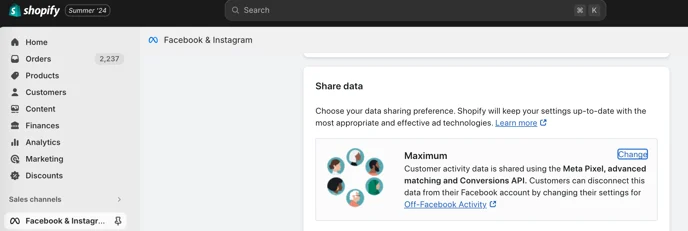
From your Shopify Admin, go to Sales Channels and select Facebook & Instagram.
Open the Settings tab, then scroll down to Data Sharing.
You’ll likely see the setting listed as Maximum, Enhanced, or Conservative.
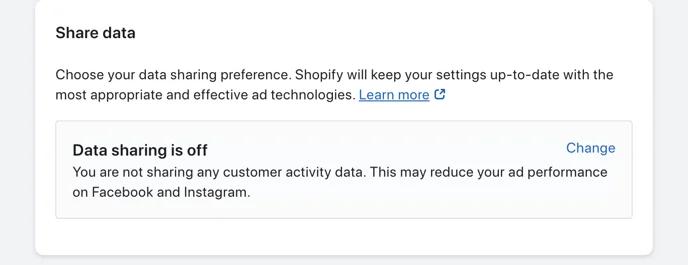
Click Change, then toggle the setting to Data Sharing Off.
This disconnects your Meta–Shopify integration and stops Shopify from sending both server (CAPI) and browser (pixel) events.
Turn Off Data Sharing for TikTok-Shopify Connection
Turning off TikTok data sharing in Shopify works differently than Meta. If you switch it off completely, Shopify may display warnings about a missing data connection.
Instead, Popsixle recommends using a "dummy" TikTok pixel so Shopify stays connected, but doesn’t interfere with Popsixle’s data.
Step 1: Create a new TikTok pixel
Go to ads.tiktok.com > Tools > Events > + Connect New Data Source.
Choose Web Events and set it up as a standard browser pixel.
Name it something clear, such as “Shopify-Browser-Events-Only.”
Step 2: Update Shopify TikTok Sales Channel settings
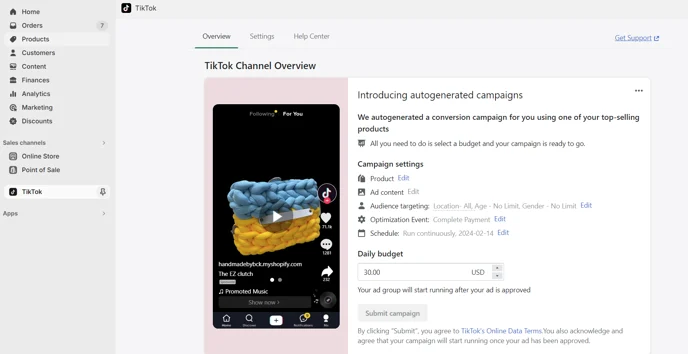
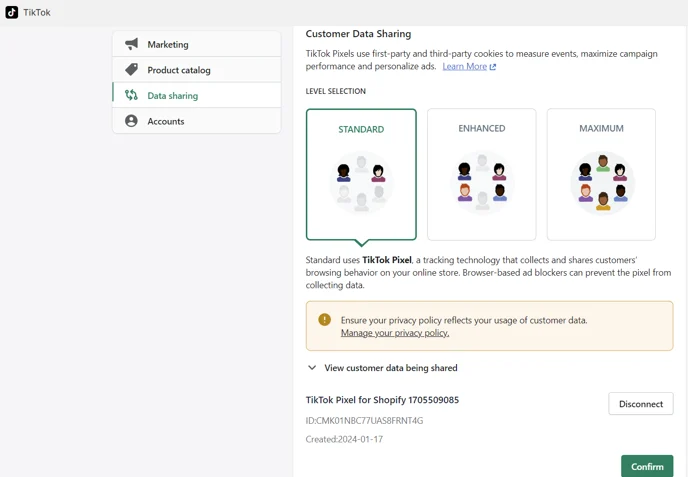
In Shopify Admin, go to Sales Channels > TikTok > Settings > Data Sharing.
Disconnect your current active pixel (formatted like CN1234567ABCDEFG).
Connect your new dummy pixel instead.
Note: It doesn't matter whether the dummy pixel is set to Standard, Enhanced, or Maximum since it won’t affect your campaigns.
Alternative Option (if you can’t use a dummy pixel)
Switch your Shopify–TikTok data sharing setting to Conservative.
This won’t completely remove duplicate data, but it reduces the risk of over-counting and sets you up for the best possible data accuracy.
FAQ - Turning off a CAPI/server-to-server connection
At Popsixle, our mission is to give you the most accurate data connection and the best ad performance possible. Here are the most common questions we get about turning off extra connections like Shopify CAPI, Trackify, Elevar, Hyros, or Wicked Reports:
Why should I turn off my Shopify CAPI connection (or other CAPI tools)?
Because having more than one server-to-server connection creates duplicate events.
This causes:
Over-reporting in Meta Events Manager
Inaccurate results in Ads Manager
Since Popsixle already sends fully aligned browser + server events, keeping Shopify’s CAPI (or others) active adds no benefit — it only increases risk.
How do duplicate CAPI connections cause over-reporting?
When multiple sources send the same event, Meta receives duplicates. Because Meta already loses about 60% of data from user opt-outs, it fills in the gaps with data modeling — essentially “guessing” what happened with the missing events.
For example:
If you had 10 sales, Meta might only see 4 and then “guess” the other 6.
With Popsixle active, all 10 sales are delivered accurately.
But if another connection is also sending events, Meta may combine its guesses with duplicate signals and end up double-counting purchases.
By turning off extra connections, Popsixle remains your single, accurate source of truth.
Why should I trust Popsixle over Shopify CAPI?
Popsixle’s connection is more reliable than Shopify’s Conversions API (CAPI).
Shopify CAPI: Loses ~60% of data (due to Meta’s opt-out rules).
Popsixle: Sends 100% usable, first-party data with no loss.
That’s why Popsixle customers typically see:
+40% lift in ROAS
-20% drop in CAC
+25% more scalability in spend
What happens to my performance if I turn off Shopify CAPI?
You won’t lose anything important. In fact, you’ll gain accuracy with Popsixle.
If you’ve been over-reporting, you may notice a “drop” at first — but that’s just your reporting becoming more accurate.
We’ll work with you to optimize campaigns and get the most from clean, reliable data.
What Meta–Shopify data sharing setting should I use with Popsixle?
Set your Shopify Data Sharing to Conservative.
This allows:
Product Catalogs to continue working
Browser events to still flow through the pixel
Avoid Enhanced or Maximum settings, since those options would continue sending data through Shopify CAPI and risk duplication.
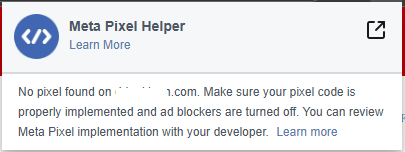
Why is my Pixel not showing on Meta Pixel Helper?
Our Popsixle support will not show in the Meta Pixel Helper because our system operates independently of the plugin. Popsixle sends both browser and server events directly to Meta, so if you plan to track for specific events, the most accurate way is to check into the Meta Events Manager and look for the specific event (including their values and data quality) as this shows the complete picture of what Meta is receiving from Popsixle.
How is Popsixle different from other solutions?
Shopify CAPI (and similar Conversions API tools)
Shopify’s Conversions API (CAPI), built and maintained by Facebook, follows Meta’s terms of service. This requires data from opted-out users to be dropped, which means you lose a significant portion of reporting accuracy.
Popsixle works differently. It uses a first-party connection. By sharing your pixel with Popsixle, both parties agree to updated terms that allow Popsixle to send your website data directly to your ad account while following strict data governance practices. The result is compliant, fully usable data that Meta can act on.
Learn more in our article: Does Shopify's Conversions API Actually Help Facebook Ad Performance?
Trackify (and other offline event upload tools)
Offline event uploads were originally designed for in-person sales, such as retail stores or food trucks. When used to backfill missing website data, they provide only limited details for each purchase, which makes deduplication and user matching difficult.
Popsixle sends far more detail. It includes matchable data points such as order ID, event time, and IP address, which help Meta accurately deduplicate events. It also provides hashed identifiers (email, phone number) and Facebook click IDs (fbclid) that link a purchase directly to a specific user.
TripleWhale / Northbeam (and other attribution platforms)
Attribution platforms and Popsixle serve very different purposes, and in many cases they work well together.
Attribution platforms focus on making you smarter in how you manage ads. They turn read-only data into dashboards and provide insights that guide manual adjustments a few times per week.
Popsixle focuses on making Meta smarter. It delivers 100% of your usable data back to Meta, powering its machine learning to make real-time automatic optimizations that improve ad performance.
When combined, attribution platforms give you insights for decision-making while Popsixle ensures Meta has the clean, accurate data it needs to optimize campaigns on its own. This pairing helps you maximize performance while freeing up your time to focus on running your business.
Wetracked.io
The main difference is in how the data is handled after capture. Wetracked focuses on capturing accurate event data and passing it back to the ad platforms so they can handle attribution. Popsixle goes a step further by structuring, routing, and optimizing the data for better match quality, cleaner event signals, and stronger attribution performance.
In practice, Wetracked is a good solution for improving tracking visibility, while Popsixle is built more around data quality and signal optimization. Popsixle helps ensure events are sent in the right format, with the right identifiers, and in a way that supports better platform matching, new customer tracking, and more reliable downstream optimization. That makes Popsixle especially useful when clean attribution, compliance, and more advanced event handling matter most.
Contact Us
Have questions or need help? Reach out via live chat (during business hours) or email us at success@popsixle.com.