
Why Are My Meta Ads Manager and Popsixle Purchase Numbers Different?
Overview
If you’ve ever looked at your purchase numbers in Popsixle’s Data Summary and then compared them to what you see in Meta Ads Manager, you might notice that the numbers don’t always line up. It can feel like something’s wrong, especially if you’re expecting them to match exactly.
But in many cases, this is completely normal — and there’s a good reason for it.
The difference comes down to how each platform collects, attributes, and reports data. Meta only reports purchases it can directly attribute to an ad click or view. Popsixle captures a broader set of valid purchase events that include Meta tracking data, even if Meta doesn’t take direct credit.
The following cases explain why these differences happen and what they mean for your reporting and optimization.
Case 1: Popsixle Shows More Purchases Than Meta Ads Manager
Meta Ads Manager only displays purchases it can directly attribute to a user clicking or viewing an ad, based on its default attribution window of 7-day click and 1-day view.
If a purchase happens outside that window, or if Meta can’t link it to an ad interaction (e.g., if the fbclid is missing or tracking is blocked), the purchase won’t appear in Ads Manager.
Popsixle, on the other hand, shows all valid purchases that include Meta tracking data (e.g., fbp or fbc parameters). Even if Meta doesn’t take direct credit for the purchase, these events still help improve Meta’s optimization and learning models.
Case 2: Popsixle Shows Fewer Purchases but Higher Revenue
Popsixle uses richer, higher-quality data than what’s available through the Meta Pixel alone. This includes:
Actual order value (AOV), including taxes and other line items
Filtering out duplicate or incomplete events
As a result, Popsixle may report a slightly lower number of purchases, but with a higher total revenue. This often provides a view that more accurately reflects your store’s actual performance.
Case 3: Meta and Google Both Take Credit for the Same Purchase
If your Popsixle account is connected to both Meta and Google Ads, you might see the same purchase appear in both platforms’ reporting. This happens when a purchase includes a gclid (from a Google ad click) and a fbclid or fbp/fbc (from a Meta click or view).
Both platforms detect the event independently and may each take credit for the conversion by attributing it to their own ads.
To explain further, Google reports a conversion when a gclid is present from a Google ad interaction. Meta can also track that same purchase if the session includes Meta tracking data like fbclid, fbp, or fbc.
This kind of overlap is normal. It's also why you shouldn’t add totals across ad platforms directly, since each uses its own attribution logic to report conversions.
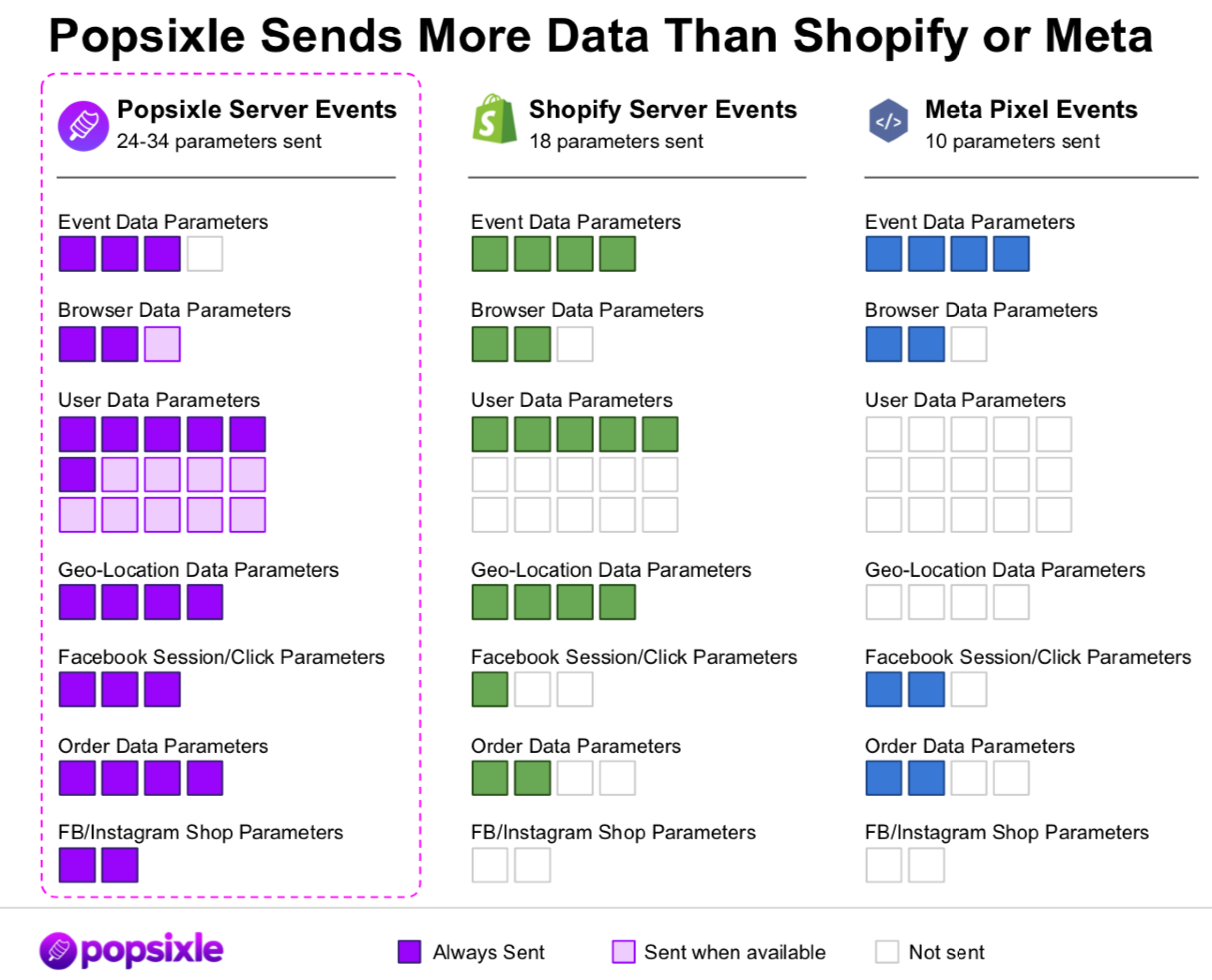
Case 4: Popsixle Sends More Data Than Shopify or Meta Pixel
Popsixle sends more event data to Meta than either the Meta Pixel or Shopify’s native CAPI. This richer dataset includes enriched user data, geolocation, browser and device information, and detailed order metadata. All of this helps Meta improve ad optimization and learning, even for conversions it doesn’t directly attribute.
Here’s how they compare:
Popsixle: Sends 24–34 parameters per event, including user data, location, browser details, and full order value
Shopify CAPI: Sends around 18 parameters
Meta Pixel alone: Sends roughly 10 parameters
By giving Meta more context with each event, Popsixle improves the quality of data Meta can use to optimize your ads.
Summary
Meta Ads Manager shows only the purchases it can attribute to specific ad clicks or views (using the standard 7-day click / 1-day view window).
Popsixle shows all valid purchases containing Meta tracking data, even if they aren’t directly attributed, providing you with a more complete view of performance and optimization potential.
Popsixle also sends richer event data to Meta, improving its machine learning systems even beyond the numbers you see in reporting.
Contact Us
Have questions or need help? Reach out via live chat (during business hours) or email us at success@popsixle.com.